Sophie M.
What a lifesaver this has been! Doing everything by hand before took forever and was just never quite right but these actions are fantastic and have really helped me get editing quicker and to a high standard. Brilliant. Highly recommend.
Christine W.
Love this action! Thank you!
Michael P.
I am in love! These actions have speed up my editing time and have given me great results. I high recommend.
lucy P.
Always love LSP actions, so easy to work with and so much advice on the videos on how to use them.
Brenda A.
Amazing actions make my life and images so easy!
Shannon T.
Great selection to cater to all from background to skin
Shaindel M.
I edit exclusively with LSP Actions. Every one of them are phenomenal. The Newborn Signature Suite is absolutely fabulous and helps me create the perfect image every single time! If you are a newborn photographer and have not tried LSP Actions yet, this is your sign to buy this and unlock tremendous potential - you will be just as happy as I am!
Tran M.
Just purchased! Haven’t used the actions yet, but the process was easy and I’m excited to test them out.
BRENDA G.
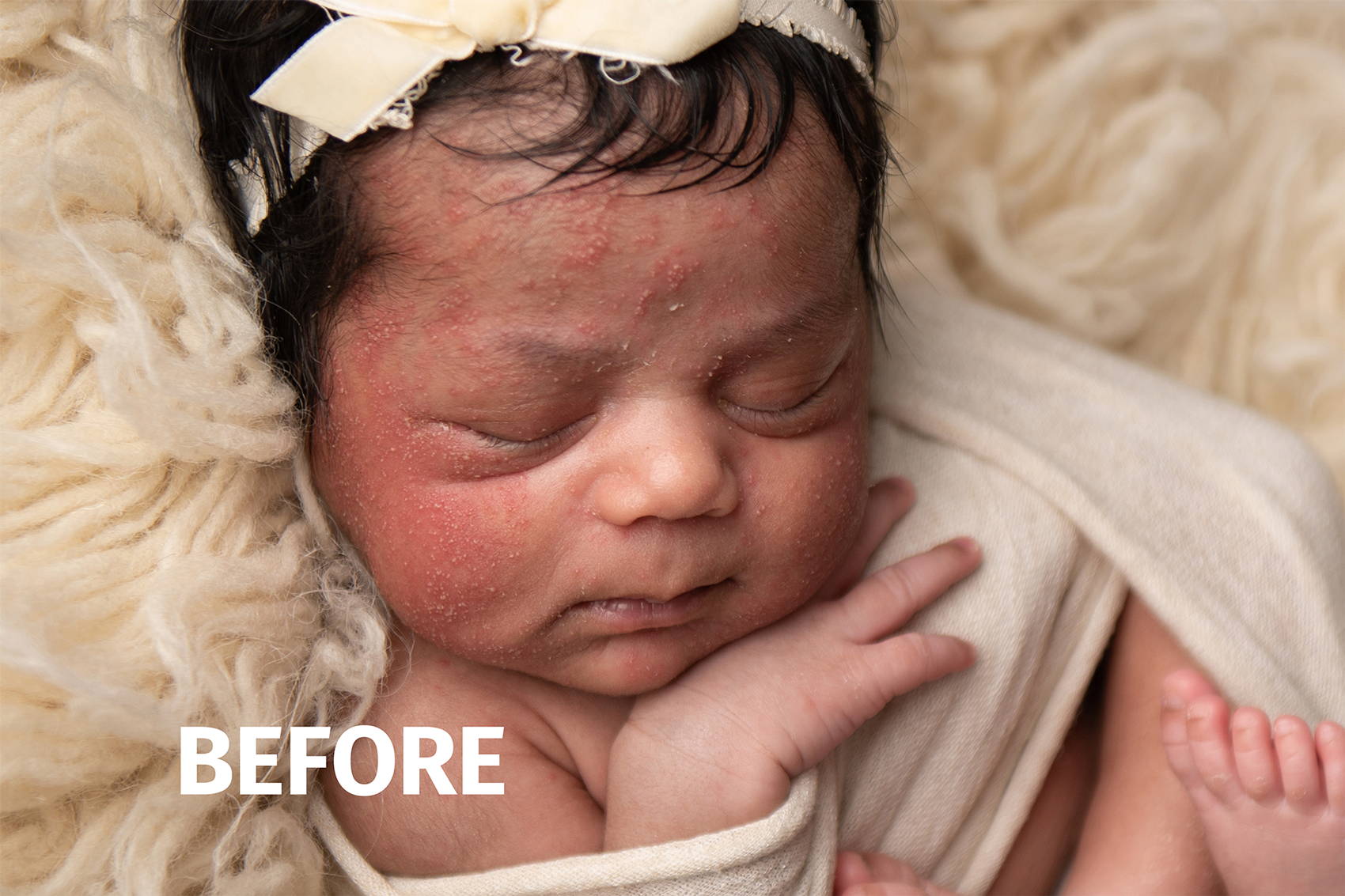
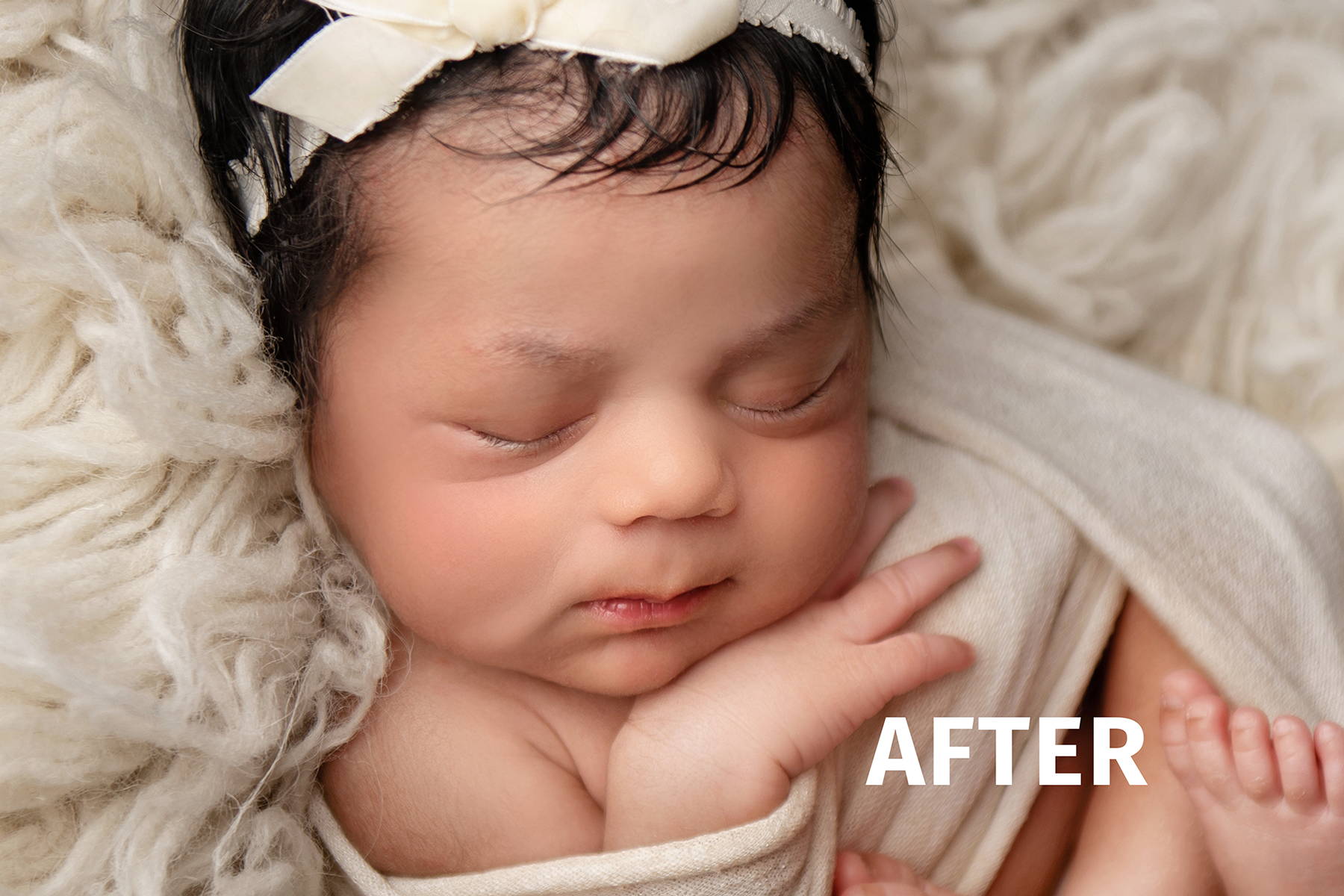
I had just finished photographing a newborn baby with very flaky, red blotchy skin. I was beside myself about how I was going to edit a full gallery in a timely manner with so much work ahead of me. I purchased the Signature Newborn Photoshop action and was so pleased. I was able to zip through editing a gallery in half the time I expected. Love this action! Thank you!
Devianna C.
I appreciate the well explained videos. What I appreciate the most is that they are thoughtfully set out, as a photographer and someone that's really beginning in Photoshop, and Lightroom, it can be complicated to figure out the most simplest of things like how to just download the software. The videos and the introductions alone were incredibly helpful and gave me knowledge that I didn't even know I needed and for that alone, I appreciate.
And of course, all of the Photoshop actions are incredibly helpful. They've been making my photos come out so much better I wish I would've purchased this sooner.
Hannah F.
Absolutely love!! Makes editing so much quicker and easier. So glad I found these actions!!
Divya S.
Love the work flow with LSP signature newborn ♥️
Divya S.
Love the flow of brushes , it’s super easy .
Beware : it’s addictive
Kristel V.
Really nice and easy actions
Amber K.
I’ve bought several presets for both Photoshop and Evoto. I absolutely love them — if I could, I’d buy them all!
Geneve S.
I love LSP actions! I use it everyday!
Fiona M.
LSP actions are simply wonderful, easy to install and use but they fall into second place when you consider the customer service which is excellent! I had an issue which Sally went above and beyond to resolve for me. Thank you LSP team
!!
CHRISTINA A.
Loved using these to create a colored soft dreamy look and elegant and timeless black and whites.
Vrushali S.
The LSP Signature Newborn Photoshop Action Set has been a game-changer for me! It has drastically reduced my editing time while ensuring stunning, consistent results. After nearly two years in business, I finally tried it—and I’m in love! Highly recommend it to all newborn photographers. Thanks, LSP team!
Chloe F.
Absolutely loved the newborn package by LSP. Completely changed the way I edit and the time it takes me!
cecile H.
It was easy to use. And everything was really good explained
Judit S.
For this babay photo I used LSP Signature newborn action suite and all I can say it is a game changer! Everything I needed to make this photo perfect is there! And it makes every photos of mine POP! Thanks for your hard work Lauren!
Devorah T.
This action set is Awesome! Really speeds up the editing process and helps with creating a consistent workflow to follow with each newborn session. Thanks!
kavya c.
The presets are excellent, providing stunning results that have truly elevated my photography. They are easy to use and have saved me a tremendous amount of time in editing. The variety and quality of the presets are outstanding, and they work perfectly with my workflow.
Kalyn S.
I love the actions in this set. I’m still learning newborn photography but these actions help so much.
Sowmya P.
Loving it ! Thank you
Kristina P.
By far these are the best newborn actions I have purchased! Thank you!
Kristen L.
I can’t believe how easy these newborn actions have been for my editing process!
melissa t.
This action set has saved me from hours of editing ..
Definitely one of my favorites
Chloe M.
Essential for all Newborn Photographers! These actions are super easy to import into Photoshop, try out and use! It's been simple and fun to try out and test all of the different elements and it helps to create incredibly stunning images!
Diane S.
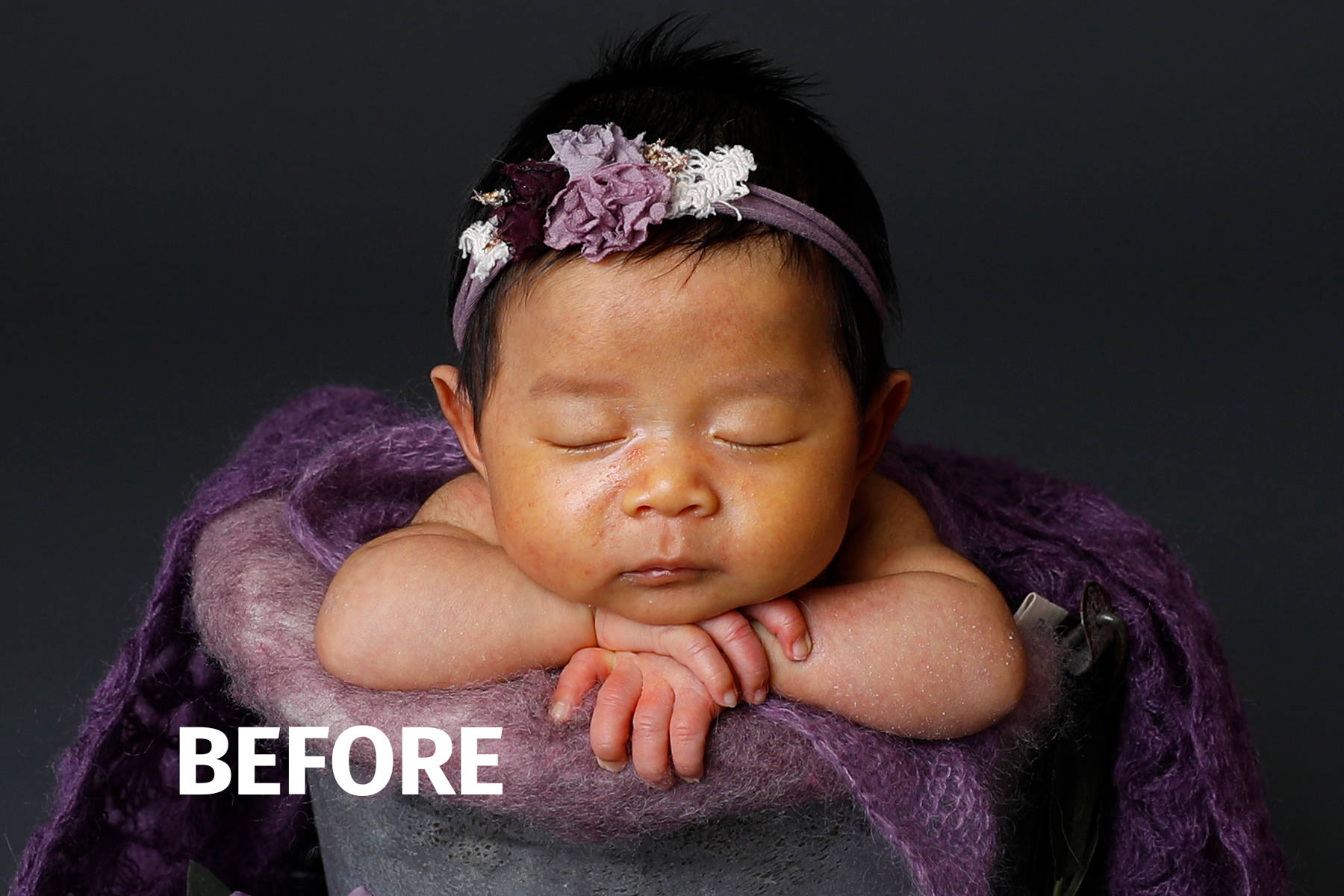
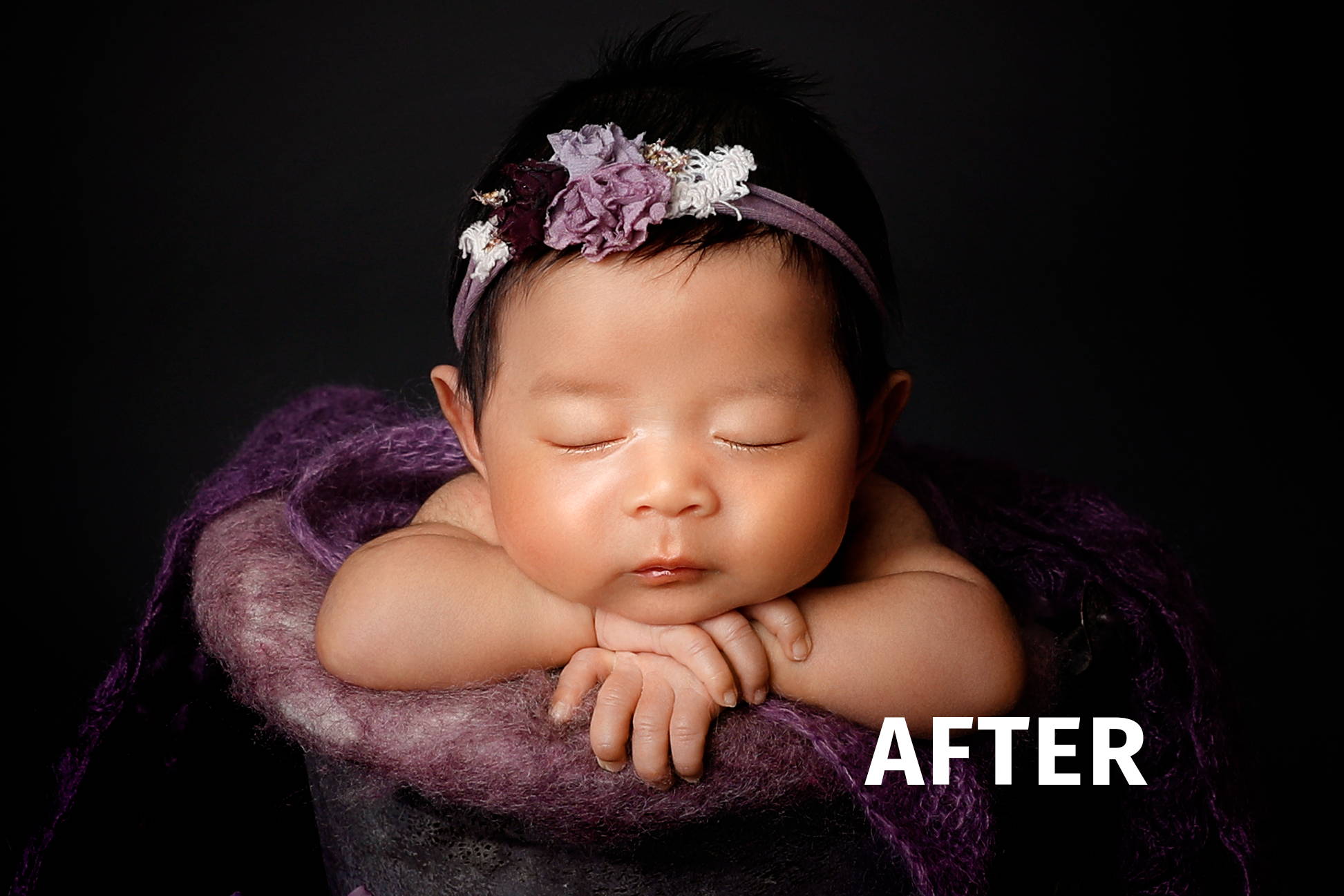
Editing this newborn session was a challenge, her skin was so dry and flaky. Yet the actions in the Newborn Collection smoothed them out and got rid of them almost completely. They also gave her a nice creamy skin tone.
Sana I.
The LSP Photoshop Actions for newborn photography are a game-changer, effortlessly enhancing and transforming precious moments into stunning works of art.
One of the standout features
of this set is its versatility. The
actions are fully customizable,
giving me the flexibility to
adjust the opacity, contrast
and saturation according to
my desired vision. This level
of control ensures that each
photograph maintains its unique
characteristics while benefitting
from the beautiful enhancements
these actions provide
Tamara E.
This package has really helped me take my editing to the next level.
Dailiam M.
Makes life easier.
Well recommended for every photographer out there.
salome g.
Im in love with newborn actions for Photoshop it is so easy to use . it creates magic with one click . thank you so much for creating it and giving us opportunity to make unforgettable memories ❤️
Jeanese H.
Such a lovely set of actions for newborn sessions, I also use them for my work with NILMDTS and they work so well for difficult edits.
Sameer K.
Love these actions. They make editing so quick and easy.
Priscilla V.
I love how fast my editing has become!
Kristin S.
Love all this set has and beings to the editing process!
Olga R.
Thank you so much! I love it. Save a time and perfect skin retouching in few minutes!
Kim O.
I’m loving my new Newborn editing actions! I have never been able to have the “smooth baby skin” look. So fun using!
PALIKA C.
I recently tried the photoshop actions from LSP actions, and i’m impressed! The actions are well crafted, delivering professional results with ease. The variety of effects and the user-friendly interface make it a valuable tool for both beginners and experienced users. Highly recommended for enhancing creativity and streamlining workflow.
Anka P.
This has helped me so much with my newborn sessions! I recommend this! It gives that next level professional pop and I love it. :)
Madalina E.
beautifull thank you
sheila marie r.
I love lsp action for newborn. it was awesome in enhancing the photos of the baby and I really appreciate how responsive the staff .
Amey F.
Love your Photoshop newborn actions and all your products I have purchased over the years!
Wendy m.
Using the Signature Newborn Actions has helped so much with my editing workflow and delivering these images to mum and dad - thank you
Sue M.
I've had these actions two weeks and they have cut my work load beyond my wildest dreams.
Thank you
Sue McDonnell xx
Wendy G.
Wow! I haven't used actions before but this newborn collection has speeded up my editing no end. I'm now loving editing rather than getting frustrated
Ana Maria S.
Love how easy to use and time saving this program is. Makes everything so enjoyable.
KATHERINE K.
These actions definitely save time. I like that I can adjust them to suit my style and each baby's skin editing needs.
Ina B.
Absolutely love it! ❤️
Sharron K.
Absolutely love the LSP Actions for photoshop. The newborn collection makes things easy and seamless. Would highly recommend x
Haneen A.
My everyday (Must-use) editing action ❤️❤️ Thanks Lauren!
Helen D.
I've only just scratched the surface of these actions and I absolutely love them! With just a few clicks, I've transformed this image which originally had a lot of red and yellow (jaundice) in the skin tone. It's so easy to use and I can't wait to try out the other actions in the collection. There is so much here I can see how this will be my go to action set in the future
Trish R.
I want to buy them all. Seriously upped my game 500%!
Rebecca M.
My favourite actions to use! Easy to navigate, tutorials available. I can’t recommend enough. ♥️
Heather P.
This action set has saved my life, before I could never get my newborns faces nice and clean. I use all the time now!
Karen D.
Absolutely obsessed! Makes editing that much faster! Don’t know how I ever did a whole session without using these presets. Complete game changer!!
April D.
I have so many LSP products, and love them all! I use them on every newborn session and most others as well.
Clare N.
LSP actions are amazing and I am never disappointed when I purchase on of their products.
Kirsty B.
LSP is my go to for every single gallery. As an editor, my clients always use LSP. Why? Because Lauren is a genius and her actions work!
Lindsay W.
I am a natural light, lifestyle photographer. All of my newborn sessions take place within my clients homes. I've been looking for a a more detailed action set for a bit, and I'm so so glad I found this set before my most recent session! As you can see, baby's skin was heavily affected by newborn acne and with this set I had the confidence I needed to deliver beautiful images. Clients are so happy as well, and that's what matters most. Thrilled that I now have these actions to address every issue I come across!
Veronica A.
I am a beginner with photography and editing. I had no idea how to edit, much less use photoshop and I can’t thank Lauren enough for coming up with this newborn package and I definitely plan to purchase many more of the editing tools she has to offer. The tutorials are life saving, I’m still no pro, but gosh all the helpful tools she has created, have made me feel more confident about editing photos.
Thank you
Vivek S.
I love LSP actions. I purchased the signature newborn pack and it does wonders. The editing time has reduced drastically and the skin brushes are extremely helpful. Can't wait to try other actions as well.
Kimberlee N.
Signature Newborn photoshop actions has been a lifesaver for saving editing time. Edits take less than half the time and are very effective without being "too much". I hate editing programs that look like you just threw a filter on. I like that your pictures still can have your own individual style. This program just gives you efficient tools to accomplish this.
Tim T.
WOW!!! I mean...WOW!!!
This is the first attempt using a mixture of brushes, settings and frequency separation and just had to show the before and after. As this session was at the clients home I didn't have access to my usual array of throws and this was more of a pre-session as Summer was under the weather and suffering from a heat rash I didn't know what to expect.
LSP have hit the nail on the head with these actions and I look forward to using them on other projects...not just newborn. Well done.
Robyn B.
Such an ease to use. Just click the action you want, paint and save. FINALLY my newborns have clear beautiful skin.
Sam H.
These actions have really upped my editing skills, I cannot even compare them to my old actions they are amazing. They offer everything you could possibly need to edit a newborn gallery and I love all the different black and white options to enhance my gallery even more
jeannine d.
I use this action set on every single image. so easy to use.
Pamela H.
Amazing how the actions work. Super easy! I really love them!
Nicole S.
Easy to use and really balances out the finicky newborn skin tones. I used to spend hours editing newborn shots and this was maybe 5 min on each photo.
Martina M.
I am in love, really. I had lot’s of action, but these are game changer. You can edit your photos so fast and at the same time the result is absolutely amazing. Every time…
Trish R.
I found these helpful tools by accident and I immediately downloaded them after seeing examples. It is truly remarkable how they transformed good shots into magical ones. I can't wait to play around with them more and experiment on everything they can do!
Pamela C.
Hands down the best newborn action set I’ve purchased!!!
Rebecca S.
1st time using these actions and I love them! I'm very much a beginner with this being my 5th newborn shoot however I'm in love. Thank you! X
carol s.
These actions have absolutely changed my editing for the better. So easy to use and have noticed a massive difference in my editing straight away. Thank you so much will definitely be buying more in future.
Irina G.
With LSP actions, my editing process wet from 4 photos per hour to 10 photos. Amazing, and really worth every single penny. The best investment what photographer can do to ease editing process.
Agata R.
It’s so easy now to edit baby skin
Tiffany D.
Love the newborn collection!
Beate L.
I´m so in love with the actions. Baby skin retouching is so much easier than before and it only takes a few minutes. Wish I had seen them earlier.
Courtney M.
I love how simple and easy it is! They’re all broken up into categories and makes the editing process seamless!
Sirisha D.
LSP actions are a saviour for me when I entered into newborn photography. They are quick and gives out all the needed editing tools in a just a click!
michael d.
This is the first time I've had a go at baby photography, my grandson Rayyan was my model. Used the LSP action set for the first time really amazed at the result.
Looking forward to gaining more experience and better results with both photography and editing.
Mick
Samantha A.
I didn't know what I was missing.
These actions made my editing so much quicker, life easier and my customers happier with a faster turnaround.
Definitely recommend to any newborn photographer.
Emma C.
My first ever newborn photoshoot, edited with LSP actions. It made my life so much easier! So quick and easy to use. Looking at purchasing some lightroom pre-sets next!
Kathryn L.
After just a short amount of time using these actions, I've cut my editing time down by at least 75%. The little flakes action is incredible and versatile. The hype for these actions is real, I am so glad I purchased them.
Keo T.
Love them, making my life as easier as a photographer
Callan B.
Great actions, they help so much!
Tina K.
absolutely love these actions!! and presets!!I want them all
Joy N.
LSP Newborn Action Pack helped me with the skin tones of this sweet baby girl’s session. The red reducer was a life saver!
Hayley D.
Amazing products - I have bought a few now and definitely would buy more! Thank you
Nicole O.
I’m new to newborn photography and LSP was highly recommended to me by several photographers. The actions are really easy to use and there are many tutorials to get you going! Love it. I’ve already bought another action set ❤️
Lauren C.
So easy to navigate & stunning actions. These have helped me create and bring my vision to life. Highly recommend!